We design and implement practical automation workflows that connect your tools, speed up lead follow-up, and reduce admin time, without replacing your current systems.
Workflow map + automation plan
Clear steps, tools, and ownership across your process.
Connected tools + tested automations
Forms, CRM, email, and reporting working together reliably.
Documentation + handoff
Simple docs so your team can run it confidently.
Reporting dashboard (weekly/monthly)
Automated summaries that show what’s working and what’s not.
Ongoing optimization option
Improve workflows as your business and volume change.
Faster follow-up
Leads get timely responses without manual chasing.
Cleaner CRM data
Fewer duplicates, missing fields, and messy notes.
Fewer manual steps
Reduce copy/paste work across tools and teams.
Better visibility and reporting
Know what happened this week without digging.
More consistent operations
Workflows run the same way every time.



Many local service businesses lose leads for one boring reason: requests come in from everywhere. Then someone gets busy and follow-up happens late. Website forms, phone calls, Facebook messages, and “quick emails” pile up. As a result, response time slows, opportunities get missed, and the CRM stops matching reality.
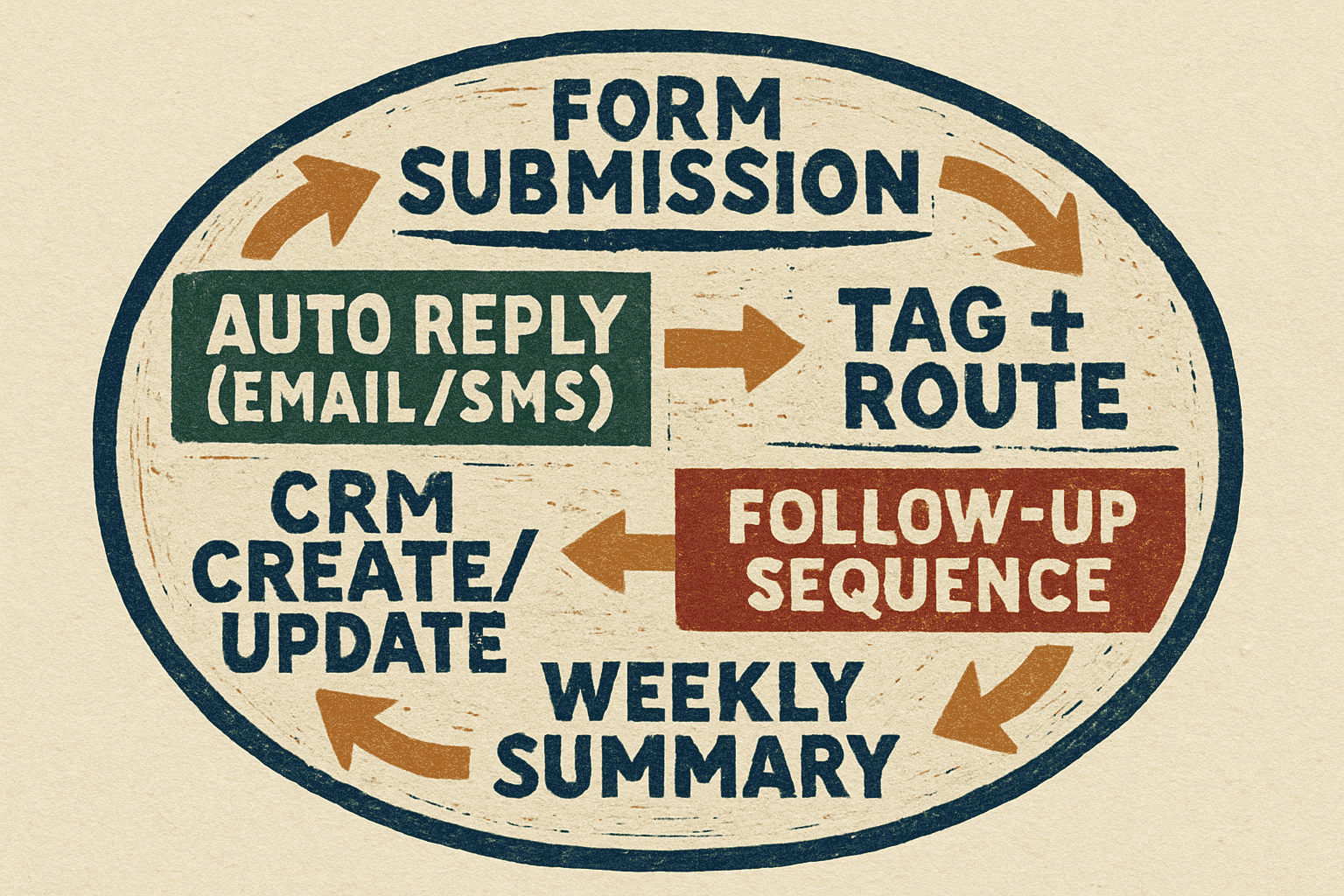
In this example, we connect your website form, call tracking, inbox, and CRM into one workflow. For example, the system replies instantly, tags the lead, and routes it to the right owner. That means follow-up starts based on service type, location, urgency, and time of day. If the lead goes cold, the workflow escalates and re-notifies the team so nothing sits unnoticed.
Leads sitting in an inbox without a reply
No clear “owner” of a new lead
Duplicate records and missing fields in the CRM
Manual copy/paste between forms, email, and spreadsheets
Inconsistent follow-up timing that loses jobs to faster competitors
Lead comes in (form, call, or message)
Instant confirmation goes out (email/SMS)
Lead gets tagged (service, location, source, urgency)
CRM record is created/updated with clean fields
Lead is routed to the right person or pipeline stage
Follow-up sequence starts automatically
Escalation triggers if there’s no response within a set window
A weekly summary reports lead volume, response time, and pipeline movement
What changes is simple: leads get a fast response, handoffs stay consistent, and reporting is clear. In practice, you spend less time on admin and more time closing work.
Agencies and consultants often run into the same issue: onboarding lives in email threads, deliverables get tracked in scattered tools, and reporting becomes a manual scramble every week. Even when the work is excellent, the operational side feels messy. That slows delivery, creates missed steps, and makes scaling painful.
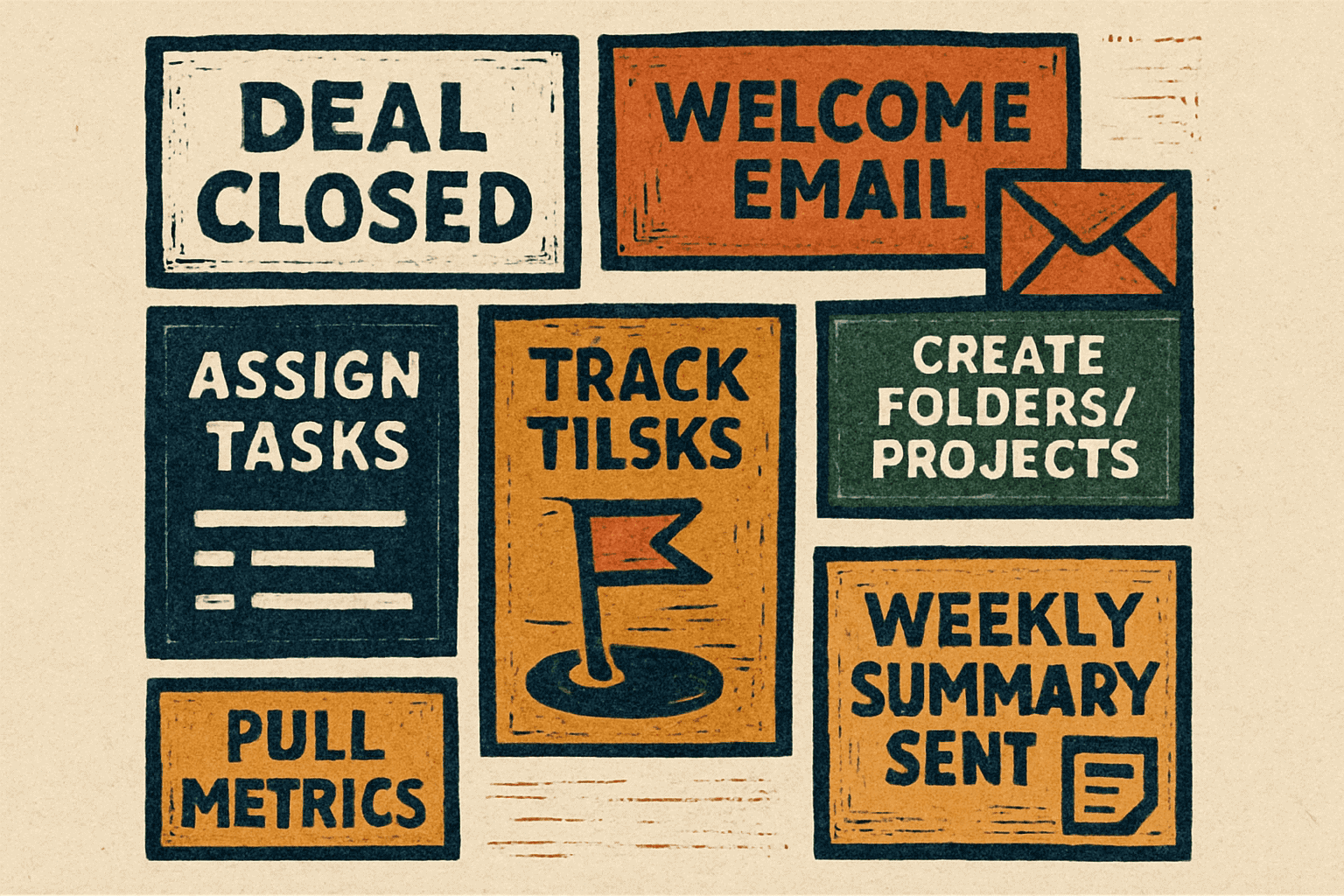
In this example implementation, we automate onboarding from the moment a deal closes. The workflow sends a welcome message, collects intake details, creates the right folders and project structure, and triggers internal tasks so the team starts clean every time. Then we connect analytics and CRM data into an automated weekly summary that delivers the numbers that matter, without spreadsheet work or last-minute “what happened this week?” panic.
Onboarding steps handled differently depending on who runs it
Missing assets, logins, or intake info that delays kickoff
Reporting that takes hours and still feels incomplete
No consistent view of pipeline, performance, or project status
Team members relying on tribal knowledge instead of a system
Deal is marked “closed won” in the CRM
Welcome email + onboarding instructions go out automatically
Intake form collects goals, access, and key details
Project folders and templates are created consistently
Tasks are assigned to the right team members with due dates
Milestones trigger status updates and internal alerts
Weekly report pulls metrics (traffic, leads, pipeline, spend, KPIs)
A summary is delivered automatically to the client and/or internal team
The result is a consistent onboarding experience, fewer dropped steps, and reporting that arrives on schedule. You gain visibility into pipeline and performance, and your team stops wasting time recreating the same setup for every new client.
Answer a few quick questions and we’ll recommend the best automations for your business. It takes less than 60 seconds, and the plan is tailored to your systems, your workflow, and your goals. No sales pressure. Just a clear plan.
Built around your existing tools and process
Focused on fast wins and high-ROI automations
Clear next steps you can implement immediately
Any business that handles leads, requests, scheduling, customer communication, or recurring internal tasks can benefit. If you repeat the same steps every day, copy/paste data between tools, or miss follow-ups because the team gets busy, automation usually delivers fast wins.
No. We build automation around your existing stack whenever possible. We connect the tools you already use (forms, email, CRM, spreadsheets, scheduling, reporting) and make them work together more reliably so you get results without a disruptive rebuild.
It depends on complexity, but most projects start with quick wins in the first 1–2 weeks, followed by deeper workflow improvements over 3–6 weeks. We prioritize high-impact automations first, then expand based on ROI and your team’s capacity.
You’ll get a clear breakdown of what to automate first, which tools to connect, and how the workflow should run. We’ll identify bottlenecks, quick wins, and opportunities to reduce admin time and missed leads. If you want us to implement it, we’ll turn that plan into a build roadmap.